
Week 9 study notes
Users, Tasks, Context, and Outcomes
Frame a product problem before designing a flow by writing specific user, task, context, and outcome statements, marking evidence and assumptions, then translating the strongest sentence into a user story and acceptance criteria.
Lesson focus
A useful product problem sentence names a specific user, the task they are trying to complete, the context that changes what matters, and the outcome that makes the task valuable. This framing becomes sharper after the learner can read the visual surface with craft vocabulary.
Learning materials
Includes study notes, references, and practice examples.
Guided tutorial path
Work through the lesson by section. Each stop names the evidence to produce before the final readiness gate.
Lesson contents
Lecture spine
Session 4 moves from screen reading into problem framing. In Session 2, the learner inspected one screen and named its job, action, support, status, and friction. Now she learns to write the sentence that should come before the screen: this user, in this context, wants to do this task so they can reach this outcome.
Session 4 moves from screen reading into problem framing. In Session 2, the learner inspected one screen and named its job, action, support, status, and friction. Now she learns to write the sentence that should come before the screen: this user, in this context, wants to do this task so they can reach this outcome.
This is a product-owner habit. Before asking whether a button should be larger or a page should include a comparison table, the team should know what user moment it is supporting. Otherwise, every design discussion becomes taste, preference, or feature shopping.
The goal is not academic phrasing. The goal is a practical sentence that improves product decisions. A strong sentence makes layout priority clearer, AI prompts sharper, user stories less vague, and acceptance criteria easier to write.
- 01FrameWho is trying to do what?Name the user moment before naming a solution. The learner should start with who, what, where, and why.
- 02SeparateWhat is the user action?Separate the task from the screen or feature. The task should be a verb phrase the user would recognize.
- 03LocateWhat situation changes the design?Add a context detail that changes priority, effort, trust, or language.
- 04DecideWhat result matters?Name the outcome so the team can judge whether the solution helped.
Why this matters professionally
The professional sources behind this session share a common pattern: good product and service work begins with understanding the user, task, need, environment, and value before committing to a solution.
The professional sources behind this session share a common pattern: good product and service work begins with understanding the user, task, need, environment, and value before committing to a solution.
GOV.UK guidance is useful because it treats user needs as a serious starting point for public services, not as decorative empathy language. NIST summarises human-centred design through explicit understanding of users, tasks, and environments. NN/g task analysis helps us inspect what people actually do, not just what a screen displays.
For a beginner, the teaching translation is simple: do not start with "we need a feature." Start with "a person in this situation needs to do this, so this result can happen."
- Understand users and their needs before deciding what to build.
- Look at users, tasks, and environments together, not as separate trivia.
- Write needs in a way that explains what people are trying to do and why.
- Treat user stories as conversations about value, not as empty templates.
- Keep evidence and assumptions visible so the framing can be checked.
Vocabulary for problem framing
Session 4 gives the learner a vocabulary for problem framing. These words are intentionally plain. They should make product thinking easier, not make the learner perform expertise.
Session 4 gives the learner a vocabulary for problem framing. These words are intentionally plain. They should make product thinking easier, not make the learner perform expertise.
The most important distinction is task versus feature. "Comparison table" is not the user task. "Compare three options and choose a shortlist" is closer. Once the task is clear, the team can decide whether a table, quiz, card stack, filter, or conversation UI is the right support.
The second important distinction is output versus outcome. A screen can be shipped and still not help. An outcome describes the useful result that should change because the design works.
User
The person, role, or group in a situation who is trying to use the product.
Example: A first-time parent comparing baby monitors, or a returning customer recovering from a failed payment.
Task
The action the user is trying to complete. It should usually be written as a verb phrase.
Example: Compare three products, book an appointment, check delivery, save a shortlist.
Context
The situation that changes what the user needs, trusts, understands, or can reasonably do.
Example: On a phone, under time pressure, new to the category, worried about cost, or missing a document.
Outcome
The useful result that makes the task worth completing. It is not the screen or feature itself.
Example: Choose confidently, finish without support, avoid a missed appointment, or understand the next step.
Evidence
Something observed, heard, measured, or tested that supports the framing.
Example: A support-ticket pattern, a user quote, a screen observation, or analytics drop-off.
Assumption
Something the team believes could be true but has not checked enough yet.
Example: Users abandon checkout because costs appear too late, or new parents do not understand technical terms.
The user-task-context-outcome sentence
The session sentence is: A [specific user], in [specific context], wants to [task] so they can [outcome]. This is not the only possible product framing format, but it is a useful beginner structure because it forces four decisions into the open.
The session sentence is: A [specific user], in [specific context], wants to [task] so they can [outcome]. This is not the only possible product framing format, but it is a useful beginner structure because it forces four decisions into the open.
A strong sentence is specific enough to guide design but not so narrow that it invents a fake person. It should not become a stereotype. "A first-time parent comparing baby monitors late at night" is useful because it affects language, reassurance, and comparison needs. "Anxious mums aged 28 to 35" is weaker because it implies psychology and demographics without enough evidence.
The sentence should create design consequences. If the context does not change what information, action, tone, support, or recovery should appear, the context may be decorative.
Writing the user well
A useful user description is specific in relation to the task. It does not need age, gender, income, or lifestyle unless those facts change the product decision and are supported by evidence.
A useful user description is specific in relation to the task. It does not need age, gender, income, or lifestyle unless those facts change the product decision and are supported by evidence.
For this course, the learner should describe users through role, situation, experience level, motivation, and risk. These details help design decisions. A first-time user may need orientation. A returning user may need speed. A worried user may need reassurance. An expert user may need control and precision.
The learner should also learn restraint. If she does not know something, she should mark it as an assumption instead of writing it as fact.
- Role: what relationship does the person have to the product or task?
- Experience: are they new, returning, expert, uncertain, or assisted?
- Motivation: what triggered this task now?
- Risk: what could make the task feel costly, unsafe, embarrassing, or urgent?
- Access: what device, ability, language, or environment may shape use?
Writing the task well
A task is bigger than one click. Task analysis asks what people are trying to do, what steps they take, what knowledge they need, where they make decisions, and where they get blocked.
A task is bigger than one click. Task analysis asks what people are trying to do, what steps they take, what knowledge they need, where they make decisions, and where they get blocked.
The learner should write tasks with verbs: compare, choose, book, cancel, recover, pay, check, learn, save, share, apply, confirm. If the task is written as "use the dashboard" or "view the page," it is probably still too close to the interface.
Tasks can happen before, during, and after a screen. A payment screen may fail because the user did not understand cost earlier. A confirmation screen may fail because the user does not know what happens next. Session 4 prepares the learner to think beyond a single surface.
- 01TriggerBefore the taskWhat made the user start this task? A reminder, problem, deadline, desire, error, or external demand?
- 02WorkDuring the taskWhat actions, comparisons, decisions, fields, or checks does the user perform?
- 03AftermathAfter the taskWhat confirmation, recovery, next step, or record does the user need after acting?
Writing the context well
Context is what makes the same task require different design choices. A user comparing products on a laptop at home may tolerate a detailed comparison. The same user on a phone in a store may need faster scanning and fewer choices.
Context is what makes the same task require different design choices. A user comparing products on a laptop at home may tolerate a detailed comparison. The same user on a phone in a store may need faster scanning and fewer choices.
Context can be practical: device, time, location, bandwidth, privacy, accessibility, or data availability. It can be emotional: anxiety, uncertainty, excitement, embarrassment, fatigue. It can be product-related: cost, stock, eligibility, policy, business rule, or support process.
The test for useful context is whether it changes the product decision. If it changes tone, priority, support, recovery, or scope, it belongs in the sentence.
Writing the outcome well
Outcome is the reason the task matters. It is easy to confuse outcome with output. A comparison table is an output. Choosing a product with confidence is an outcome. A booking form is an output. Securing an appointment without calling support is an outcome.
Outcome is the reason the task matters. It is easy to confuse outcome with output. A comparison table is an output. Choosing a product with confidence is an outcome. A booking form is an output. Securing an appointment without calling support is an outcome.
The best beginner outcomes are observable. We might not measure them perfectly yet, but we can imagine what evidence would show improvement. Did the user finish? Did they avoid support? Did they recover from an error? Did they choose? Did they understand the next step?
A clear outcome helps with prioritization. If the outcome is confident choice, the screen may need comparison, tradeoffs, and trust cues. If the outcome is speed, it may need saved preferences, shortcuts, and fewer decisions.
Evidence, assumptions, and honesty
Problem statements are dangerous when they sound polished but hide guesses. The learner should learn to mark evidence and assumptions beside the sentence.
Problem statements are dangerous when they sound polished but hide guesses. The learner should learn to mark evidence and assumptions beside the sentence.
Evidence may come from user interviews, support tickets, analytics, sales conversations, observed behavior, usability tests, screen reviews, or credible prior research. In early learning work, evidence may be light. That is acceptable if it is named honestly.
The habit is: write the sentence, then write what would make it more trustworthy. This keeps AI output and personal opinion from pretending to be research.
- What evidence supports this user description?
- What evidence supports this task as important?
- What context detail might we be guessing?
- What outcome would show that the design helped?
- What would change our mind?
From problem sentence to user story
Session 4 introduces user stories and acceptance criteria lightly because the learner is moving toward product-owner capability. A user story is useful when it keeps a user need visible during team conversation.
Session 4 introduces user stories and acceptance criteria lightly because the learner is moving toward product-owner capability. A user story is useful when it keeps a user need visible during team conversation.
The user story format should not become a ritual. A weak user story can still be vague. The useful move is translating a strong problem sentence into a story, then adding acceptance criteria that make the need checkable.
Example: As a first-time parent comparing baby monitors, I want to compare the top three options by safety fit, price, and tradeoff, so that I can choose without reading every review. Acceptance criteria might include visible reason labels, comparable tradeoffs, and a save or continue action.
- 01NeedStart with user needUse the sentence to explain the product problem in human terms.
- 02StoryAs a..., I want..., so that...Translate the need into a user story only after the need is clear.
- 03CriteriaMake the story testableWrite three checks that would let a team inspect whether the story was satisfied.
AI problem-framing lab
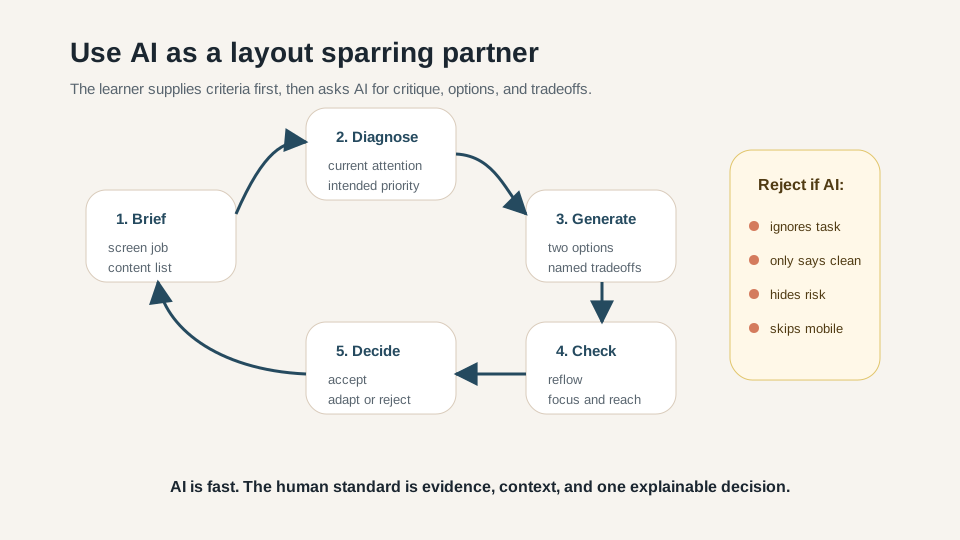
AI is especially useful in Session 4 because it can generate alternative framings. A beginner may write the first sentence too broadly. AI can offer variations, surface assumptions, and suggest more precise language.
AI is especially useful in Session 4 because it can generate alternative framings. A beginner may write the first sentence too broadly. AI can offer variations, surface assumptions, and suggest more precise language.
The danger is that AI can make invented user insight sound polished. The prompt therefore asks for evidence needed, assumptions that could be wrong, and feature-request flags. These requirements keep the learner in charge.
The learner should practice a simple review habit: accept specific improvements, adapt wording that is useful but broad, and reject claims that pretend to know the user without evidence.
I am learning to frame a product problem before designing a screen.

Raw idea or screen I am thinking about:
[describe the idea, current screen, product category, or user situation]

Please help me write user, task, context, and outcome statements in simple English.
Return:
1. Three possible problem sentences using this format:
   A [specific user], in [specific context], wants to [task] so they can [outcome].
2. For each sentence, name the evidence needed to trust it.
3. For each sentence, name the assumption that could be wrong.
4. Flag any sentence that sounds like a feature request instead of a user need.
5. Recommend the strongest sentence and explain why.
6. Turn the strongest sentence into one user story and three acceptance criteria.

Rules:
- Do not invent research or metrics.
- Keep the user specific but not a stereotype.
- Keep the task as an action verb.
- Keep the outcome as a human or product result, not a screen or feature.
- Ask me for missing context before making confident claims.
- Does AI produce more than one possible framing?
- Does it separate user, task, context, and outcome?
- Does it identify evidence needed instead of inventing certainty?
- Does it flag feature-request language?
- Does it recommend one framing with a reason?
- Does the learner accept, adapt, and reject parts of the answer?
- The answer says "users want a dashboard" without explaining the task.
- The answer invents research, conversion rates, personas, or metrics.
- The answer uses stereotypes as user definitions.
- The answer gives outcomes such as "better UX" or "more engagement" without observable meaning.
- The answer jumps to screen design before framing the problem.
Worked examples
A strong statement should make design implications visible. In the product recommendation example, the screen probably needs a small shortlist, tradeoff labels, trust signals, and a clear next action. In the appointment example, the product probably needs availability, confirmation, fee clarity, and recovery.
A strong statement should make design implications visible. In the product recommendation example, the screen probably needs a small shortlist, tradeoff labels, trust signals, and a clear next action. In the appointment example, the product probably needs availability, confirmation, fee clarity, and recovery.
A weak statement usually names a feature too early. It may sound productive, but it hides the reason the feature matters. The learner should ask: if we did not build that feature, what user task would still need support?
The tutor can use these examples as live correction patterns. Ask the learner to point to the user, task, context, and outcome in each strong sentence.
Studio exercise and rubric
The studio output is a user, task, context, and outcome sheet. It should include three candidate sentences, one selected final sentence, evidence needed, assumptions, a user story, and three acceptance criteria.
The studio output is a user, task, context, and outcome sheet. It should include three candidate sentences, one selected final sentence, evidence needed, assumptions, a user story, and three acceptance criteria.
The tutor should keep the learner away from solution polish. This is not the session for drawing the screen. It is the session for making the product moment clear enough that the next layout session has something real to prioritize.
- 01Part ADraft the first sentenceChoose one familiar product idea or one screen from Session 2. Write a rough problem sentence without AI.
- 02Part BUse AI to widen optionsRun the Session 8 prompt. Ask for alternatives, evidence needed, assumptions, and feature-request flags.
- 03Part CSharpen the framingChoose the strongest sentence and revise user, task, context, and outcome until each part changes a product decision.
- 04Part DTranslate to product-owner languageTurn the sentence into one user story and three acceptance criteria.
- Names a specific user moment without stereotyping.
- Writes the task as a clear user action.
- Includes context that changes priority, effort, trust, or language.
- Names an outcome that can be observed or checked.
- Marks at least two assumptions that need evidence.
- Rejects feature-request language when it appears.
- Creates one user story and three acceptance criteria from the final sentence.
Home study and follow-up reading
For home study, the learner should choose three familiar product moments. For each, she should write the problem sentence, one possible user story, three acceptance criteria, and two assumptions that would need evidence.
For home study, the learner should choose three familiar product moments. For each, she should write the problem sentence, one possible user story, three acceptance criteria, and two assumptions that would need evidence.
The lecturer can use the references below to strengthen future examples, especially around user needs, task analysis, human-centred design, user stories, acceptance criteria, and AI-assisted framing.
Follow-up reading for the lecturer
Resources and submission
Keep the review materials close, but separate from the main path.
Use these blocks when preparing the final artifact or checking optional references after the guided tutorial.
Artifact, self-check, and base prompt
Start from one rough product idea or screen, write three candidate problem sentences, run the user-task framing prompt, choose the strongest framing, and turn it into one user story with three acceptance criteria.
- Can the learner describe a user moment specifically without stereotyping?
- Can the learner write the task as an action rather than a feature?
- Can the learner add context that changes priority, effort, trust, or language?
- Can the learner distinguish outcome from output?
- Can the learner name evidence and assumptions without pretending guesses are facts?
- Can the learner translate the final sentence into a user story and three acceptance criteria?
I am learning to frame a product problem before designing a screen.

Raw idea or screen I am thinking about:
[describe the idea, current screen, product category, or user situation]

Please help me write user, task, context, and outcome statements in simple English.
Return:
1. Three possible problem sentences using this format:
   A [specific user], in [specific context], wants to [task] so they can [outcome].
2. For each sentence, name the evidence needed to trust it.
3. For each sentence, name the assumption that could be wrong.
4. Flag any sentence that sounds like a feature request instead of a user need.
5. Recommend the strongest sentence and explain why.
6. Turn the strongest sentence into one user story and three acceptance criteria.

Rules:
- Do not invent research or metrics.
- Keep the user specific but not a stereotype.
- Keep the task as an action verb.
- Keep the outcome as a human or product result, not a screen or feature.
- Ask me for missing context before making confident claims.
References and web examples
References
A strong government-service anchor for the habit of starting with users and their needs before policy, technology, or internal process.
GOV.UK Service Manual: user needsPractical guidance for writing user needs around what people are trying to do and why, rather than around a preferred solution.
GOV.UK Service Manual: writing user storiesA useful bridge from product discovery into delivery language: user stories are short descriptions of a need written from the user perspective.
NIST: Human-centered design and ISO 9241-210A compact professional summary of human-centred design principles, including explicit understanding of users, tasks, and environments.
Nielsen Norman Group: UX research methods glossaryA research-methods reference for task analysis: understanding what users do, how they do it, what steps are involved, and where problems occur.
Atlassian: user stories with examples and templateA product-team reference for user stories and acceptance criteria that helps connect user needs to shared delivery conversation.
OpenAI Academy: Prompting fundamentalsPrompting guidance for giving AI context, task, audience, output format, and revision requests. Session 4 uses it to generate and critique problem statements.
Figma AI tools in Figma DesignCurrent product documentation for using AI inside design work while keeping human review and judgment in the loop.
Web examples
Use this to show the difference between "we want a feature" and "users need to complete a task in a real situation." It keeps the learner from jumping straight to screens.
GOV.UK Service ManualWriting user storiesUse this when turning a user need into a small buildable conversation. It introduces the user-story format without making the course feel like software engineering.
NISTHuman-centered design and ISO 9241-210Use this to explain that professional design begins with the user, task, and environment. It gives authority to the context part of the Session 4 sentence.
Nielsen Norman GroupUX research methods glossaryUse task analysis as the bridge from screen reading into product behavior. The learner should see that a task may have steps, decisions, dependencies, and failure points.
AtlassianUser stories with examples and templateUse this as a more delivery-oriented companion to GOV.UK. Atlassian examples help show how product teams make user needs discussable and testable.
OpenAI AcademyPrompting fundamentalsUse this to keep AI useful but bounded. AI can suggest alternative users, contexts, and outcomes, but the learner must separate plausible framing from invented evidence.