KLD Institute
About
Courses
Method
Admissions
Partnerships
Policies
Contact
Menu
Institute
About
Courses
Method
Admissions
Partnerships
Learning
Course map
Flagship course workspace.
Templates
Reusable course worksheets and teaching artifacts.
Contact
How to reach the institute.
Policies
Policy index
Privacy
Terms
Accessibility
Learner code
Course map
Open study notes
Previous lesson
Visual Foundations: How Designers See Screens
Next lesson
Typography: Type Roles, Hierarchy, Readability, and Tone
Slide 15 of 36
Previous
Next
Grid guides
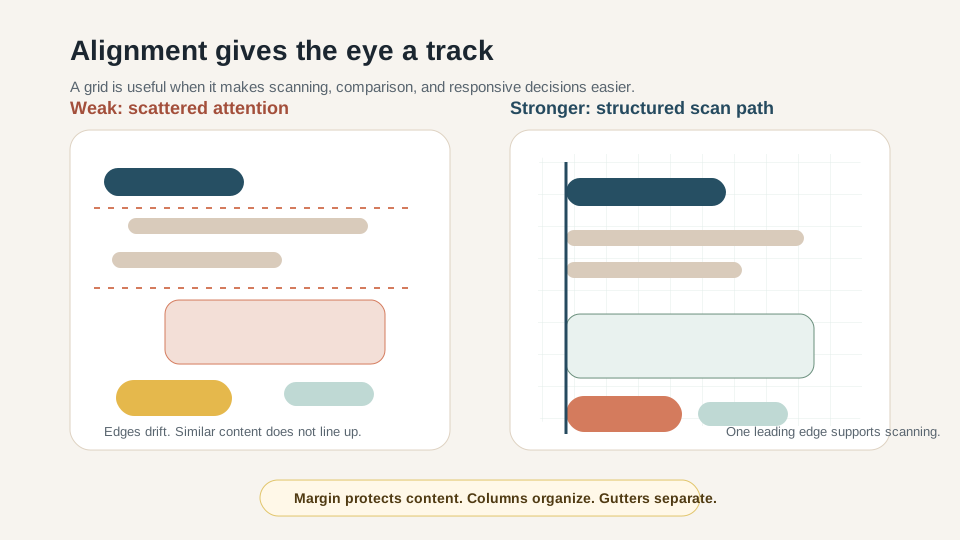
Guides make structure visible
Margins keep content from touching unsafe edges.
Columns and gutters support comparison.
A consistent leading edge reduces scanning effort.
Alignment and grid are practical tools for scan paths and comparison.
Original KLD Institute teaching diagram.
Previous lesson
Visual Foundations: How Designers See Screens
Next lesson
Typography: Type Roles, Hierarchy, Readability, and Tone